

Congratulations, it’s time to do your first progress assessment! Read our step-by-step guide to carrying out your first progress review and seeing how all your hard work has paid off!
Before carrying out your first progress assessment, make sure to also read:
- “How to Take Bodyweight Measurements”.
- “How to Take Circumference Measurements”.
- “How to Take Progress Pictures.”
- “What You Need to Know About Body Weight Fluctuations.”
- “What is Body Fat Percentage?”
- “What is Adherence?”
Key takeaways
- A precision mindset is key for preventing measurement errors.
- Measurement errors can lead you to miss making a change when you need one or making an unnecessary change.
- For each progress assessment method, make sure to use standardised techniques and procedures, always use high-quality equipment, take repeat measurements and interpret any results carefully.

The importance of a precision mindset
When completing the assessment, you must adopt a precision mindset to avoid measurement errors affecting the reliability of your results. The table below details some of the most common sources of measurement error in body composition assessment.
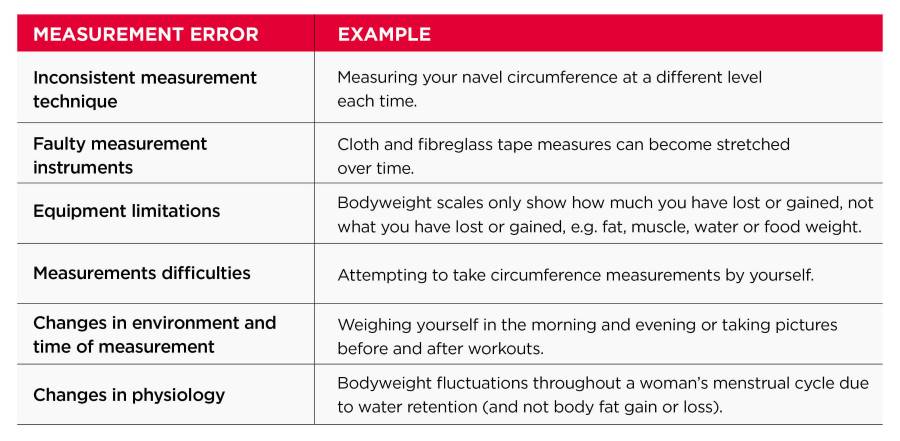
The biggest risks of measurement errors are that they can lead you to think that:
- You are making progress when you are not (also known as a ‘false positive’).
- You are not making progress when you are (also known as a ‘false negative’).
False positive results can cause you to lose valuable time as you do not realise that you may need to make changes to start seeing real progress.
False negatives can be equally frustrating, as they make it appear like your hard work is having no impact. They can also prompt you to make a change when you do not need to, like reducing your calorie intake, which makes your diet unnecessarily challenging.
So, how can you avoid measurement errors? By taking the following actions, which we will guide you through in this section:
- Use standardised measurement techniques and procedures.
- Use high-quality equipment.
- Use more than one assessment method.
- Take repeat measurements.
- Carefully interpret your results.

Once you have gathered all your data, you’re ready to go complete your first U.P. progress assessment.
Step 1
On the “Daily Tab”, tap on the “Review Your Progress” button. Input your current weight, waist measurement and progress photos, and tap on “Submit Weekly Progress”.
Step 2
You will see a review screen for the week in question, starting with a report showing your overall progress.
Step 3
Review your weight. Based on whether you have reached or are on target or off track for your goal, you can decide whether to continue with the current plan or to review the plan.
Step 4
You will see a screen that asks, “Are you able to continue with this level of calorie intake?”.
If you click “yes”, you will see the following screen:

If you click “no”, you will see a screen that says:
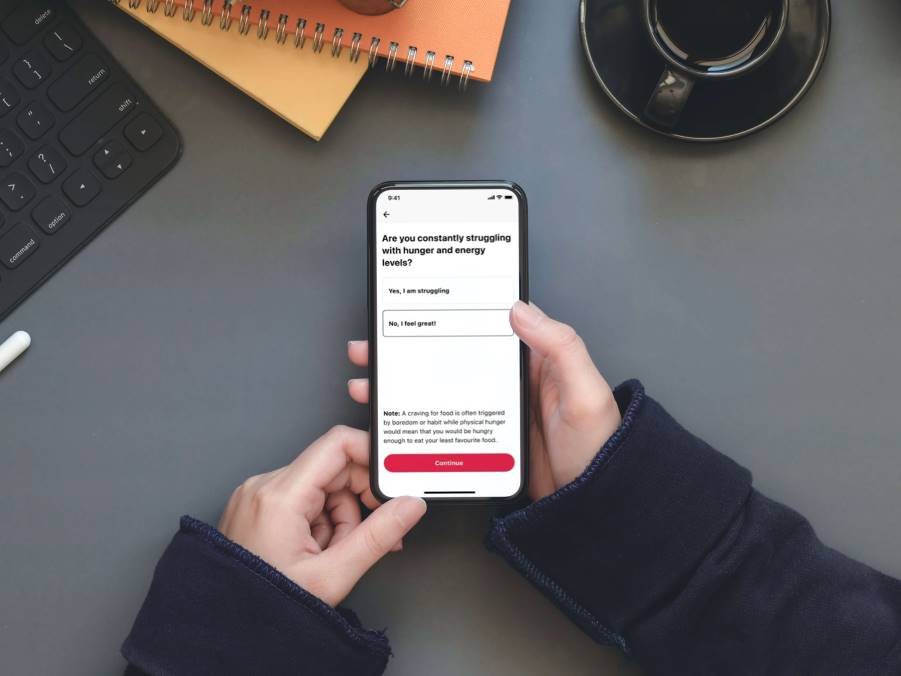
Step 5
For most people, improving your adherence will increase your rate of change. To learn more about this, make sure to read “What is Adherence?”
You can choose between “Stick to my current targets” (recommended) and “change my targets”.
If you choose to continue with your current targets, everything you have set so far will remain the same.
If you choose to change your calories, move onto step 6.
Step 6
You will now move through the following screens:
- Did you prepare all your meals yourself?
- Are you accurately measuring your serving sizes?
- Could you be retaining water due to processed salt intake?
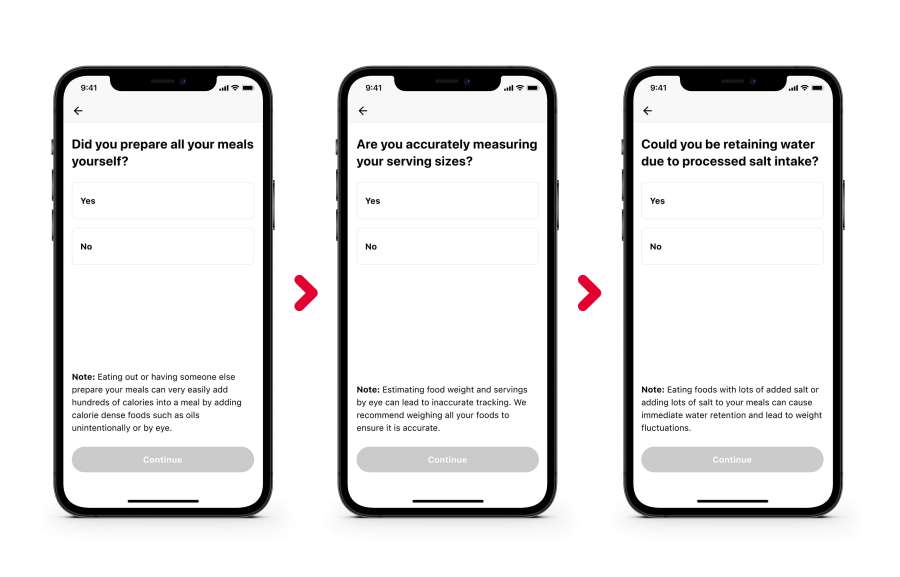
Don’t forget to also read our “Serving Sizes FAQs” article.
Step 7
You will now see a screen that says “It looks like you’re following the plan but may need to adjust your calories to keep you on track.”
You will now be able to adjust your calories up or down.
If you choose to decrease your targets, the app automatically decreases your targets by 5% for the following week and provide an adjusted daily calorie target.
If you choose to increase your targets, the app automatically increases your targets by 5% for the following week and provide an adjusted daily calorie target.
Step 8
Press “confirm” and you are ready to go.

